Combien coûte un site Drupal ? Guide pour entreprises
1. Introduction Are you a Centris-affiliated real estate agent who has purchased…

Are you a Centris-affiliated real estate agent who has purchased our automatic data import plugin? This guide explains how to install, configure, and automate the import of Centris properties to your WordPress site. If you haven’t yet purchased the plugin, you can get a copy from our website.
The plugin works using Centris files stored on your own web server . Before any configuration, you must ask Centris to send your ZIP files to your server.
Centris usually sends the files once or twice a day.
Install the following plugins on your WordPress site:
Note: Part of the plugin depends on ACF Pro. We can provide a license if needed. You can install the plugins:
wp-content/plugins folderNext, activate both plugins.
Access the control panel: 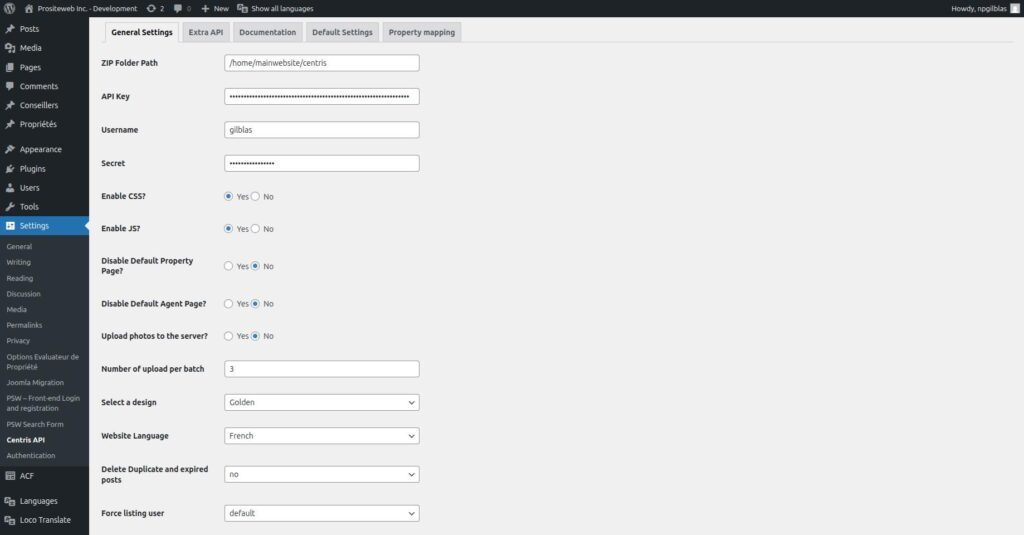
or via the menu: Settings → Immoweb MLS Sync The necessary information (license, API key and credentials) can be found in the document provided at the time of purchase. wp-admin/options-general.php?page=psw-Immoweb MLS Sync
| Field | Description |
|---|---|
| ZIP Folder Path | Full path to the Centris folder on your server. Example: /home/exemple/centris . This is the folder where the plugin will automatically read ZIP files. |
| API Key | API key provided upon purchase. |
| Username | Identifier provided after purchase. |
| Secret | Secret word provided after purchase. |
| Enable CSS | Enables the plugin styles if you are using our templates. |
| Enable JS | Enables the plugin’s JavaScript scripts. |
| Select a design | Choose the property display model. |
| Website Language | Default language for content. |
| Delete duplicate and expired posts | Automatically removes expired or duplicate registrations. |
| Field | Description |
|---|---|
| Google Map API Key | Google Maps key to display the map on property listings. |
| Zoom | Default zoom level (numeric value). |
| reCAPTCHA Key & Secret (V3) | Anti-spam protection for contact forms. |
An additional tab also contains simplified documentation.
Go to the following URL:
You should see the API entry points in JSON format. votre-site.com/CentrisAPI
Add the following tasks to your cron job:
votreurl/CentrisAPI?run_data_import=xxxxxx votreurl/CentrisAPI?quick_update=xxxxxxIf you have access to the command line, you can use our shell script available here:votreurl/CentrisAPI?run_data_import=xxxxxx votreurl/CentrisAPI?quick_update=xxxxxx
Installing the cron script https://prositeweb.us/-/snippets/17
croncentris.shAdd the following cron jobs: chmod +x centris.sh
0 * * * * /home/parimmo/cron/centris.sh run_data_import >/dev/null 2>&1 0 */3 * * * /home/parimmo/cron/centris.sh quick_update >/dev/null 2>&1 */30 * * * * /home/parimmo/cron/centris.sh emergency_process >/dev/null 2>&1 */10 * * * * /home/parimmo/cron/centris.sh quick_helper >/dev/null 2>&18. Summary0 * * * * /home/parimmo/cron/centris.sh run_data_import >/dev/null 2>&1 0 */3 * * * /home/parimmo/cron/centris.sh quick_update >/dev/null 2>&1 */30 * * * * /home/parimmo/cron/centris.sh emergency_process >/dev/null 2>&1 */10 * * * * /home/parimmo/cron/centris.sh quick_helper >/dev/null 2>&1
Thanks to this module:


Nous utilisons des cookies pour améliorer votre expérience. Politique de confidentialité


Gilblas is a senior entrepreneur and developer with around 13 years of experience, deeply involved in the WordPress community. He helps SMEs grow through custom web solutions and training. He stands out for his ability to automate and industrialize website creation through Phoenix Forge.