Connexion avec Facebook – Comment générer un identifiant et un secret API Facebook
For years, many companies dismissed Joomla not because it was incapable of…

For years, many companies dismissed Joomla not because it was incapable of supporting a serious project, but because its user interface, at first glance, seemed less intuitive than that of some highly page-builder-oriented platforms. Yet, behind this impression, Joomla hides a far more flexible architecture than one might think, with robust native components such as ACLs, workflows, repeatable subforms, template overrides, and web services. In other words, the real problem isn't Joomla itself, but the way content is conceived, structured, and managed.
By default, Joomla relies on a form-based, field-based, and admin view-based management system. This system isn't inherently bad; in fact, it's quite powerful. The problem arises when a site is built without a clear editorial strategy. At that point, a single page can depend on an article, modules, menu settings, custom fields, content injected via plugins, and sometimes even multiple configuration points within the template. The result is simple: to modify a page, an internal team might be forced to open 8, 10, or even 12 different screens. Joomla provides the tools to properly structure this content, but without governance, this power quickly turns into complexity.
This fragmentation has a direct impact on the business. Content becomes difficult to maintain, errors multiply, employee training takes longer, and even the smallest modification ends up being delegated to an external developer. This is precisely where the discourse arises that “Joomla is complicated” or “Joomla is not suitable for business.” In reality, it is not the CMS that creates this obstacle, but a poorly designed management architecture, where the administration experience has been left to chance.
Many people make a mistake by evaluating Joomla solely through its standard interface, without seeing what the core actually allows. Joomla has a very granular permissions system via its Access Control List (ACL), which allows you to define who can view, modify, approve, or publish specific content. It also offers workflows to structure the publishing process, for example, when content needs to be written by a team, approved by a manager, and then published after approval. For structured content, Joomla can leverage custom fields and subforms, including repeatable ones, which opens the door to much cleaner management interfaces for editorial blocks, sections, or components. Finally, its web services allow communication with external resources, which is particularly useful in an intranet, extranet, or other business system context.
In other words, Joomla is not limited to a WYSIWYG editor and a series of administrative menus. It can become a true content governance layer, provided that this layer is designed methodically.
The real question is therefore not “how to make Joomla look nicer in the admin?”, but rather: how to transform Joomla into a clear management interface for non-technical teams?
A strategic approach involves starting not with the technical aspects, but with the business need. Instead of asking the user to find the location of every piece of content, you should think in terms of manageable blocks. For example, a service page shouldn't require the team to separately edit the title in an article, the benefits in three modules, the calls to action in the template settings, and the documents in a separate plugin. It should offer a logical, single, or nearly single, entry point where the important sections of the page are grouped together and clearly labeled.
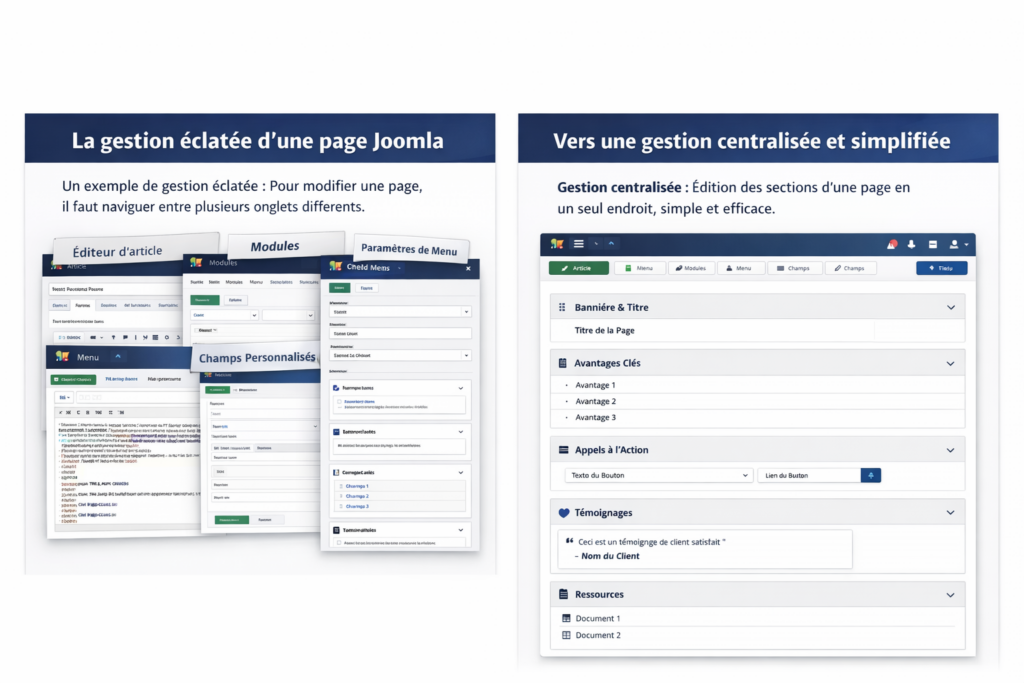
This is precisely where Joomla becomes interesting. With custom fields, repeatable subforms, permissions, and bespoke layouts, it becomes possible to build an interface where the user manages page sections like business units: banners, key arguments, documents, testimonials, calls to action, sidebars, FAQs, resources, and so on. The structure remains controlled, the rendering is clean, and the team no longer needs to hunt for information throughout the back office.
In practice, instead of treating a page as a scattered collection of technical elements, it is treated as a structured editorial object. First, the types of content that are truly useful to the business are defined. Then, the frequently recurring blocks are identified: introduction, main text, list of elements, maps, downloads, action buttons, repeating sections, data tables, etc.
From there, Joomla can serve as a foundation for centralizing editing. A subform, for example, can allow you to add multiple repeatable blocks within a single interface. Permissions can ensure that a communications manager can modify content without affecting sensitive settings. Workflows can prevent content from being published online without approval. And template overrides then allow you to display all of this cleanly on the website, without hacking the core or unnecessarily piling on extensions.
The gain for the company is enormous: fewer errors, less dependence, lower editorial maintenance costs, and above all, greater autonomy for internal teams.
At Prositeweb, this is precisely the kind of logic we sought to push further with our Phoenix approach. The idea is not to transform Joomla into a giant visual builder, but to leverage its native capabilities and well-designed architecture to offer a more intuitive management interface for non-developers.
Our principle is to design pages and blocks as structured, dynamic, and reusable elements. Instead of forcing users to understand the site's technical logic, we present them with a clear management logic. In the background, Joomla continues to act as a robust, secure, and flexible engine. On the front end, users benefit from a simpler, more consistent, and more productive experience.
It would be wrong to say that Joomla doesn't offer any more visual alternatives. The ecosystem already includes several well-known solutions. SP Page Builder 6 is a visual drag-and-drop builder compatible with recent versions of Joomla. Quix also promotes no-code, drag-and-drop page creation. YOOtheme Pro also offers a visual page builder for Joomla. Gridbox, for its part, positions itself as a more comprehensive no-code website creation solution than just a page builder.
These solutions can be relevant in certain contexts, particularly when a company wants to accelerate the creation of marketing pages or give certain teams more visual autonomy. But for an organization focused on performance, governance, sustainability, and flexibility, it's important to take a step back before making a choice. The real question isn't just "Is it faster to build?", but also "Will this management method remain clear, maintainable, and profitable in two or three years?"
Centralizing content management in Joomla isn't about adding another layer. On the contrary, it's about removing clutter, reducing data entry points, and building a truly logical administration process. This requires understanding Joomla's native structure, the company's actual needs, user roles, necessary approvals, and how the content will evolve.
Good support should therefore not simply produce a functional website. It should produce a content management system that the company can actually use without becoming overwhelmed.
The problem with many Joomla sites isn't Joomla itself. The problem lies in a fragmented content architecture, designed too hastily, often focusing on technical aspects rather than user experience. Yet, Joomla already possesses numerous native capabilities to improve this: advanced permissions, repeatable subforms, workflows, template overrides, and web services. When properly utilized, these components allow for centralized management, reduced reliance on developers, and the transformation of the CMS into a true editorial governance tool, even for intranets, portals, and environments connected to external resources.
The next useful improvement would be to give it an even more “CEO / IT management” tone, with 2 or 3 concrete examples of wasted time, hidden costs and operational gains.


Nous utilisons des cookies pour améliorer votre expérience. Politique de confidentialité




Gilblas is a senior entrepreneur and developer with around 13 years of experience, deeply involved in the WordPress community. He helps SMEs grow through custom web solutions and training. He stands out for his ability to automate and industrialize website creation through Phoenix Forge.